 claude
f779e19212
claude
f779e19212
Co-Authored-By: Claude Fable 5.1 <noreply@anthropic.com>
15 KiB
Floatplane for Jellyfin — user guide
Everything below refers to the Jellyfin web client; the Android, Android TV, iOS and desktop apps show the same channel and folders.
Contents: Install · Log in · Browse and play · Settings reference · Scheduled task · Troubleshooting · Privacy and security
Install
From the plugin repository
-
Open Dashboard → Plugins → Repositories and press +. Give it any name and enter the URL
https://gitea.brasse-pc.eu/brasse/jellyfin-plugin-floatplane/releases/download/latest/manifest.json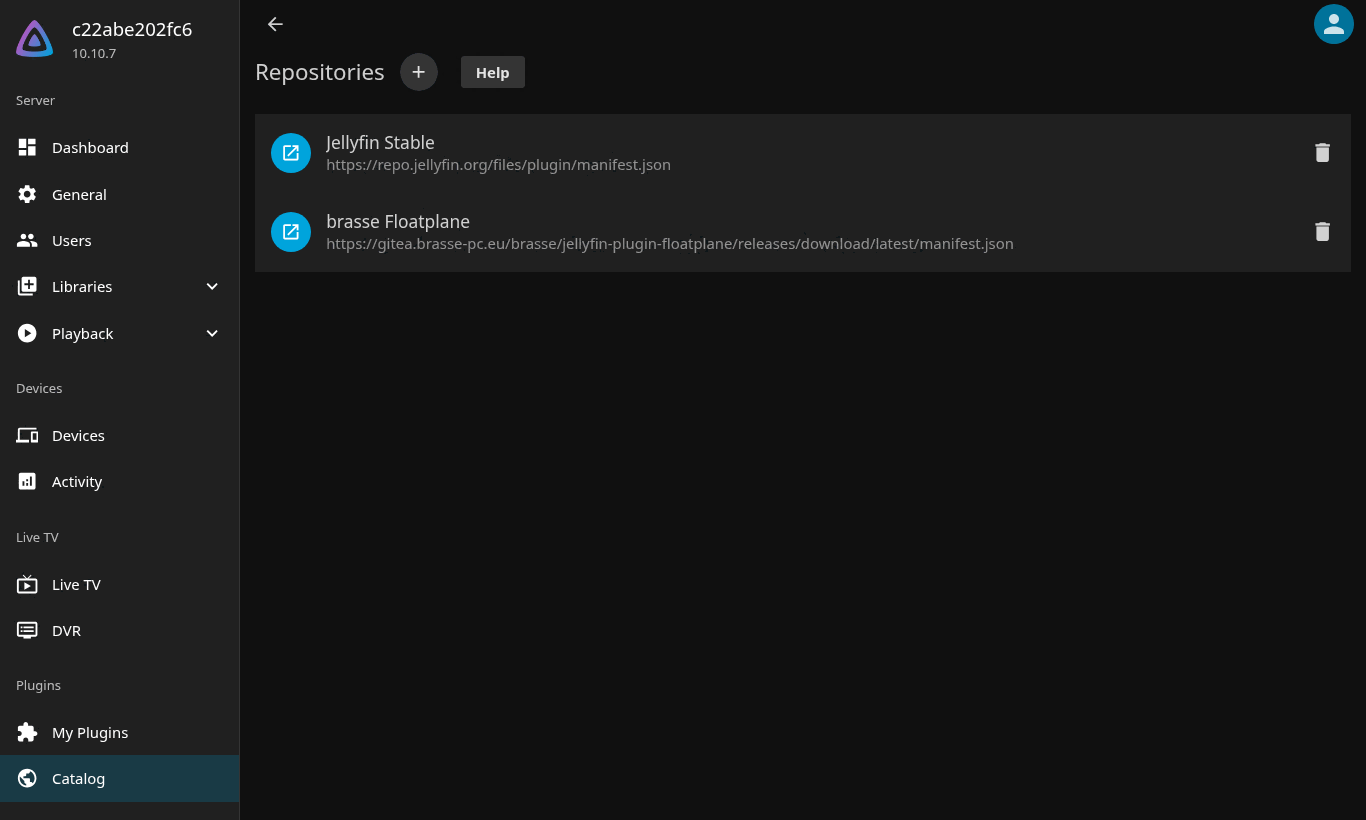
-
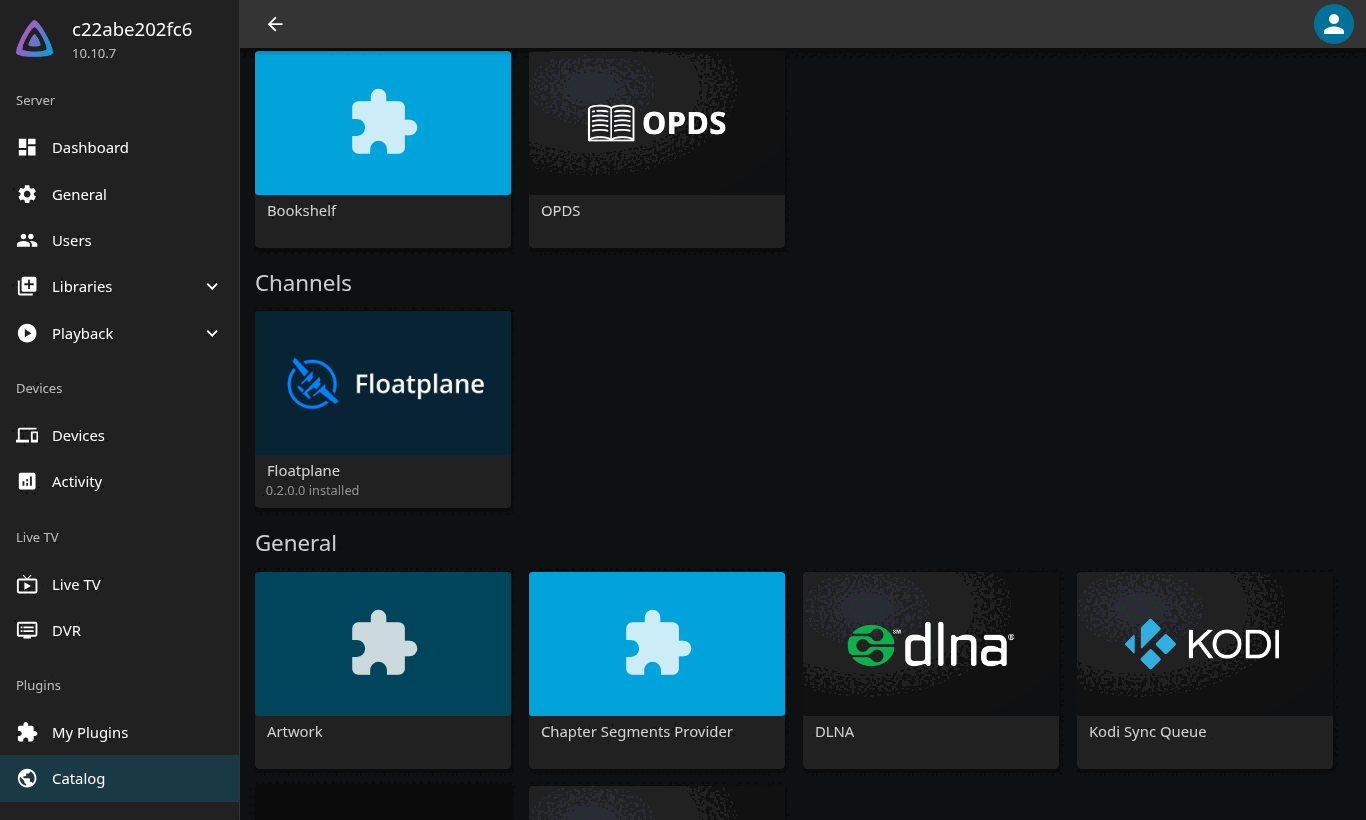
Go to Dashboard → Plugins → Catalog, scroll to the Channels section and open Floatplane, then press Install.
-
Restart Jellyfin. Dashboard → Plugins → My Plugins now lists Floatplane as Active. Click the card (or the ⋮ menu → Settings) to open the settings page.
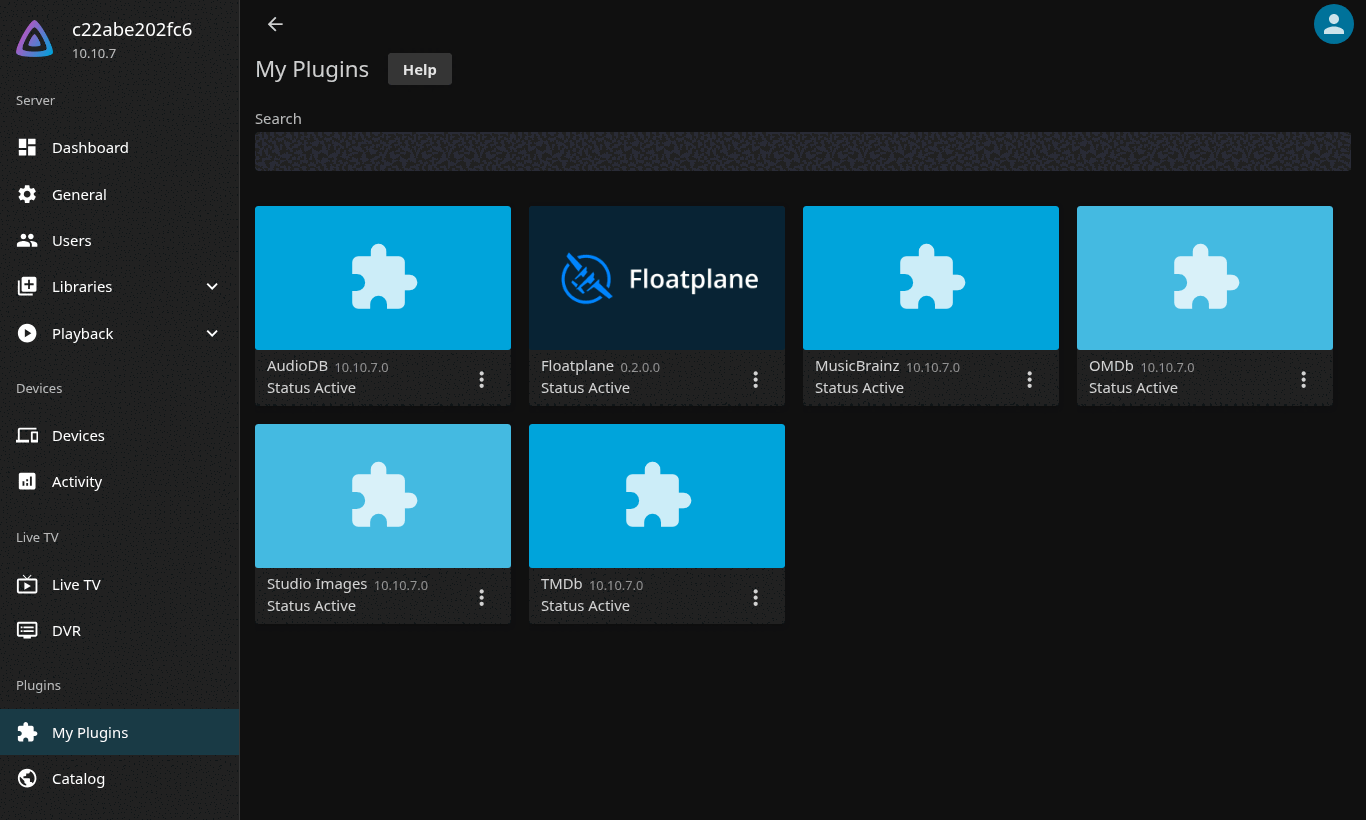


New versions show up in the catalog like for any other plugin.
With the install script
The script downloads the release, verifies the MD5 checksum, puts the plugin
in the right folder and restarts Jellyfin. It understands the
linuxserver.io image (<config>/data/plugins), the official image
(<config>/plugins) and native installs (/var/lib/jellyfin/plugins).
Run it as a user that may write there and restart Jellyfin (usually with
sudo). --dry-run only prints what would happen.
curl -fsSL https://gitea.brasse-pc.eu/brasse/jellyfin-plugin-floatplane/releases/download/latest/install.sh | sh -s -- --dry-run
curl -fsSL https://gitea.brasse-pc.eu/brasse/jellyfin-plugin-floatplane/releases/download/latest/install.sh | sh
| Variable | Meaning | Default |
|---|---|---|
TAG |
release to install | latest (or vX.Y.Z) |
JELLYFIN_CONTAINER |
Docker container to inspect and restart; empty = native install | jellyfin |
JELLYFIN_CONFIG_DIR |
host path of the container's /config (or the data dir of a native install) |
read from docker inspect |
PLUGINS_DIR |
plugin directory, overrides the detection | detected |
PUID / PGID |
owner of the plugin files | from the container, else the directory owner |
Manually
Download floatplane_<version>.zip from the
releases page,
unzip it into <jellyfin data>/plugins/Floatplane_<version>/ (the folder
must contain Jellyfin.Plugin.Floatplane.dll and meta.json) and restart
Jellyfin.
Requirements
- Jellyfin 10.10.x. The plugin targets ABI
10.10.0.0and .NET 8; Jellyfin 12.x uses a different ABI and needs a separate build (not yet available). - Any CPU architecture Jellyfin runs on: the plugin is one managed DLL (x64 and arm64 verified).
- A Floatplane account with an active subscription for playback. Browsing public creators works without logging in.
Log in
Floatplane's username/password login is protected by a Cloudflare Turnstile captcha that is bound to floatplane.com (any other site gets error 110200), so the plugin cannot log you in with your password. Instead, open Dashboard → Plugins → Floatplane and use one of the two methods below. The status block at the top of the page always tells you which session is in use and whether Floatplane still accepts it.

Option 1 — paste the session cookie (works today)
- Log in at floatplane.com in a browser.
- Open the browser's developer tools and find the cookie
sails.sidforhttps://www.floatplane.com:- Chrome / Edge: F12 → Application → Storage → Cookies →
https://www.floatplane.com. - Firefox: F12 → Storage → Cookies →
https://www.floatplane.com. - Safari: enable the Develop menu, then Develop → Show Web Inspector → Storage → Cookies.
- Chrome / Edge: F12 → Application → Storage → Cookies →
- Copy the Value of
sails.sid(a long string;sails.sid=in front is fine, the plugin strips it). - Paste it into sails.sid cookie and press Validate cookie. The page shows your username and active subscriptions.
- Press Save. The creators you subscribe to appear in the channel after the automatic refresh that follows.
When the cookie expires, the status line changes to rejected. Log in at floatplane.com again, copy the new value and repeat.
Option 2 — Login with Floatplane (OAuth device flow)
Floatplane's own apps and third-party clients (Hydravion, Wasserflug, floatplane-downloader) log in through an OAuth 2.0 device flow: you open a link, enter a short code, and the plugin receives tokens that renew themselves for about 90 days.
This requires a client id issued by Floatplane for this plugin. There is
no self-service registration; ask Floatplane (for example through their
community Discord). Without a registered id the button reports
invalid_client.
If you have one: enter it under OAuth client id, press Login with
Floatplane, open the link shown (or go to floatplane.com/link) and enter
the code. The page polls until Floatplane confirms and then shows Logged in
as …. The OAuth session replaces the cookie. Forget OAuth session drops
the tokens again. Client ids that require DPoP-bound tokens are not
supported.
Browse and play
The Floatplane tile appears under My Media. It opens a folder per creator — your subscriptions plus anything listed under Extra creators.

Each creator contains:
- All videos — every video from all of the creator's sub-channels in release order, newest first (up to the number set in the settings).
- One folder per sub-channel (for example Linus Tech Tips, TechLinked, ShortCircuit) with that channel's newest videos.


Videos carry the Floatplane thumbnail, the post text as description, the duration and release date, the sub-channel as Genre and the creator as Studio. Press Play to watch, or use the tick to mark a video as played.

Good to know:
- Order. The plugin gives every video a sort name derived from its release time, so the default Name sort of all Jellyfin clients lists newest first — no need to change the sort in every folder. Switching the sort direction flips it to oldest first. (The A–Z jump bar on the right of the web client therefore does nothing useful in these folders.)
- Watched state. A video exists twice — in All videos and in its sub-channel folder. The plugin mirrors played/resume state between the two copies automatically.
- Home screen. Recently Added in Floatplane shows the newest videos across creators; Continue Watching shows partially watched videos with their thumbnails.
- Search. Jellyfin's search finds every video the plugin has listed at least once. Floatplane's own search can be tried on the settings page (Search test).
- Locked posts. Posts above your subscription tier are hidden by default; with Show posts above my tier they appear with a 🔒 in the name and will not play.
- Playback and quality. On play, the plugin asks Floatplane for the stream (this endpoint is rate-limited to about two requests per minute; the answer is cached for six hours) and serves a rewritten HLS playlist from your Jellyfin server: the encryption key is fetched with your session, the video segments come straight from Floatplane's CDN, and Jellyfin's ffmpeg copies the H.264/AAC stream to the client without re-encoding. The available quality levels appear as Versions in the player, preferred quality first, up to Highest quality offered. 4K needs the matching Floatplane tier. Progressive MP4 versions is an experimental alternative that has not been verified yet.
Settings reference
Dashboard → Plugins → Floatplane, in page order.
Status block — plugin version, which session is configured (cookie or OAuth) and whether Floatplane accepted it, the creators and sub-channels currently loaded, cache counters and the last refresh time.
Session
| Setting | What it does |
|---|---|
| sails.sid cookie | The Floatplane session cookie (see Option 1). Needed for subscriptions and playback. |
| Validate cookie | Checks the pasted value against Floatplane without saving it and shows username and subscriptions. |
| OAuth client id | Client id issued by Floatplane for this plugin (see Option 2). |
| Login with Floatplane | Starts the device flow with that client id and shows the link and code to enter. |
| Forget OAuth session | Removes the stored OAuth tokens (shown only while an OAuth session exists). |
Catalogue
| Setting | Default | What it does |
|---|---|---|
| Extra creators | empty | Comma-separated Floatplane url-names (the part after floatplane.com/channel/, e.g. linustechtips) to list in addition to your subscriptions — or instead of them when you are not logged in. Listings are public; playback still needs a session. |
| Videos listed in "All videos" | 200 | How many of the newest videos the All videos folder contains. Floatplane returns 20 per request, so 200 = 10 requests per creator at refresh. |
| Videos listed per sub-channel | 100 | Same, per sub-channel folder. |
| Show posts above my tier (locked) | off | Include posts your subscription cannot access, marked with 🔒. |
| Listing cache (minutes) | 30 | How long the plugin keeps a folder listing before asking Floatplane again. |
| Automatic refresh (hours) | 6 | Interval of the Refresh Floatplane catalogue scheduled task. |
| Refresh now | — | Drops the caches, reloads creators and sub-channels and makes Jellyfin re-list the folders. Also happens after every Save. |
Playback
| Setting | Default | What it does |
|---|---|---|
| Preferred quality | 1080p | The version listed first and played by default. |
| Highest quality offered (pixels) | 1080 | Versions taller than this are not offered at all (keeps 4K out of the list unless you have that tier). |
| Delivery lookups per minute | 2 | Budget for Floatplane's stream-info endpoint. Raise it only if Floatplane changes its rate limit. |
| Proxy base URL | empty | How Jellyfin's own ffmpeg reaches the plugin's stream endpoints, e.g. http://127.0.0.1:8096. Empty uses Jellyfin's local address, which is right for almost every setup. |
| Also offer progressive MP4 versions (experimental) | off | Adds an MP4 version per video using Floatplane's download delivery. Untested; may not play. |
Save writes everything and triggers a refresh.
Search test
Pick a creator, type a query and press Search to run the query through Floatplane's search API and see the matching videos (date, sub-channel, title, length). This is a diagnostic tool; it does not change anything.
Updating
- Automatic: Jellyfin's nightly Update Plugins task installs newer versions from
the repository (the plugin ships with
autoUpdateon). When My Plugins shows Status Restart, restart Jellyfin. - Manual through the catalogue: Dashboard → Plugins → Catalog → Channels → Floatplane → Install (newest revision) → restart.
- Script:
install.shfrom the release (see Install above) replaces the plugin folder and restarts Jellyfin.
Step-by-step with screenshots: Update tutorial in the wiki (and the Install tutorial).
Scheduled task
The plugin registers Refresh Floatplane catalogue under Dashboard → Scheduled Tasks. It runs at server start and every Automatic refresh hours, reloads creators and sub-channels, pre-fetches the newest videos and tells Jellyfin to re-list the channel. You can run it by hand from that page, or press Refresh now on the settings page.

Troubleshooting
| Symptom | Cause / fix |
|---|---|
| Playing a video fails with NoCompatibleStream or the player never starts; the log says Cannot play Floatplane post … You must be logged-in | No session or an expired one. Paste a fresh cookie (or log in with Floatplane) and Save. |
| Playback fails right after several quick starts; log mentions 429 or rate-limited | Floatplane's stream-info endpoint allows about two lookups per minute. Wait a minute and try again; results are cached afterwards. |
| New videos do not show up | Press Refresh now (or run the scheduled task). The plugin caches listings for Listing cache minutes and Jellyfin caches channel listings for three hours; a refresh invalidates both. |
| Creators missing although the cookie is valid | Press Refresh now; check the status block for an error message. Creators without a video post yet are skipped. |
| Everything is marked 🔒 | You are browsing without a session, or the session is rejected: without login Floatplane reports every post as locked. |
Login with Floatplane says invalid_client |
The client id is not registered with Floatplane. Use the cookie method until you have one. |
| Plugin shows NotSupported or Malfunctioned | Jellyfin version mismatch (this build is for 10.10.x) or a broken plugin folder. Check the server log. |
Logs. Everything the plugin writes is tagged Jellyfin.Plugin.Floatplane
in Jellyfin's server log (Dashboard → Logs, or log/log_*.log in the data
directory — /config/log/ in the linuxserver.io image). For more detail,
copy logging.default.json to logging.json in the configuration
directory and add
"Jellyfin.Plugin.Floatplane": "Debug"
under Serilog → MinimumLevel → Override, then restart.
Paths (linuxserver.io image). Plugins live in /config/data/plugins/,
the plugin configuration in /config/data/plugins/configurations/Floatplane.xml,
logs in /config/log/. The official image uses /config/plugins/ and
/config/log/.
Privacy and security
- The session cookie or OAuth tokens are stored in plain XML in Jellyfin's plugin configuration folder, readable by Jellyfin administrators and anyone with access to that directory. Treat it like a password.
- Stream URLs handed to the player are signed with a per-process HMAC secret, so the plugin's stream endpoints cannot be used as a general relay; they only serve what the plugin itself selected.
- Requests to Floatplane carry a
Jellyfin-Floatplane/<version>User-Agent so Floatplane can identify the client. The plugin keeps to the documented rate limits. - This is an unofficial client built on Floatplane's community-documented API and is not affiliated with or endorsed by Floatplane Media Inc. Use it for personal viewing with your own subscription.